Home Tab
Start / Stop
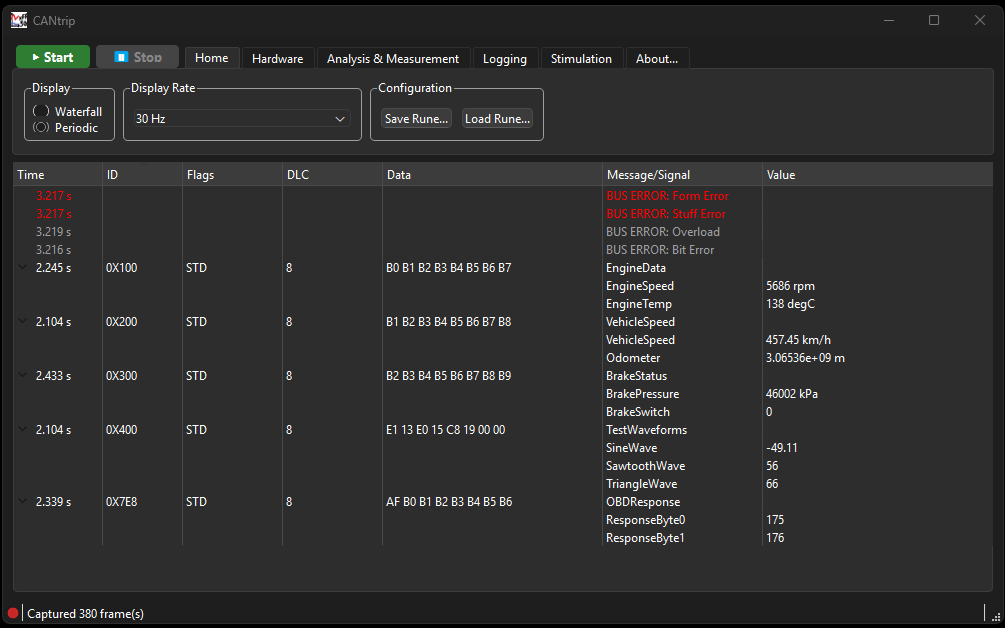
The primary capture control isn't actually on the Home tab's page, it's pinned into the ribbon's tab bar itself (top-left corner, the green ▶ Start / red ⏸ Stop pair), so it stays reachable from every other tab - you don't need to switch back to Home to stop a capture you started while looking at, say, the Stimulation tab.
Start begins a capture on whichever channel is selected on the Hardware tab, using whatever bus timing is currently configured there. Stop ends it. The status LED at the bottom-left of the window mirrors capture state: solid red when idle, blinking green/gray while capturing.
Display
Two modes, radio-selected:
- Waterfall - every frame is its own new row, newest first. This is what you want for watching individual events unfold in order.
- Periodic - one row per distinct CAN ID, updated in place as new frames for that ID arrive. The row shows the measured period (time since the previous frame with that ID) instead of a growing list. A row that hasn't seen a new frame in 2 seconds grays out, so a message that stopped transmitting is visually obvious without disappearing from the table.
Periodic mode is generally more useful for a live, healthy bus (you get one stable row per signal source instead of an ever-scrolling wall of frames); Waterfall is more useful when you specifically care about sequence and timing between individual frames.
The Stimulation tab has its own, independent copy of this same toggle for its received-frames pane.
Display Rate
A busy real CAN bus can produce far more frames per second than decoding and repainting a row for every single one can keep up with in real time - this is a genuine, previously-hit freeze bug (root-caused with ProcDump and WinDbg against a real busy bus), not a hypothetical concern. This setting throttles how often the UI actually repaints:
- Unlimited - exact frame-by-frame behavior, no buffering. May freeze on a genuinely busy bus.
- 30 Hz (default), 10 Hz, 5 Hz - only the latest frame per row (Periodic) or a bounded queue of frames (Waterfall) gets displayed at this rate. Full decode still happens for whatever frame ends up shown, frames just aren't necessarily all individually painted on a fast bus.
This only throttles display. Logging always sees every single frame regardless of this setting, and so does a Stimulation message's own transmit accounting - the throttle exists purely to keep the UI responsive, never to drop data.
Configuration (Runes)
Save Rune... and Load Rune... save/restore your whole environment - channel selection, bus timing, display mode/rate, DBC path, Graph view layout, configured Stimulation messages, Trace view column layout, and the listen-only setting. See Runes for the full field list and what happens when you load an older rune missing a newer field.