Logging Tab
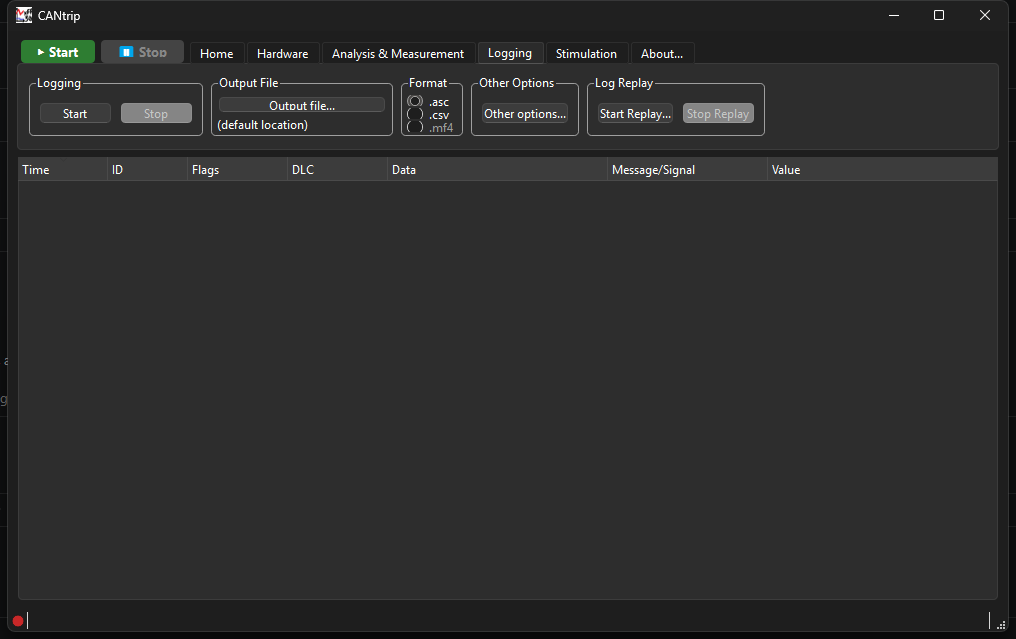
Logging
Start / Stop record every frame CANtrip sees to a file, independent of the display-rate throttle described in Home Tab - logging always sees every single frame, never a throttled subset.
Output File
Pick a destination file. The actual filename gets built from a template - see Other Options below - so this is really about picking a folder plus a base pattern, not one fixed exact filename.
Format
- .asc - a CANalyzer-compatible baseline ASCII trace format. Good default if you want the log readable by other CAN tools.
- .csv - a flat CSV with one row per frame:
Time, Channel, ID, Direction, Extended, FD, BRS, ESI, RTR, DLC, Data, MessageName, Error.DirectionisRxorTx- frames CANtrip itself transmitted via Stimulation log the same as received ones, just tagged. - .mf4 - real ASAM MDF4. Not implemented yet ("Coming soon" in the UI, the radio is disabled) - a genuinely bigger undertaking than ASC/CSV, planned but not scheduled to a specific version.
Other Options
Other options... opens a two-tab dialog:
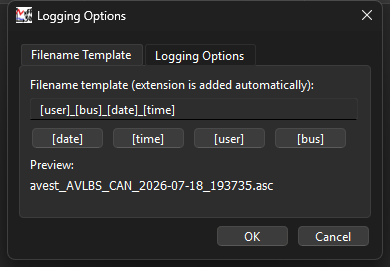
Filename Template - build the actual filename from placeholders
([date], [time], [user], [bus]), with a live preview of what the
real filename will look like. The extension is added automatically based
on the Format selection above.
Logging Options - the rest:
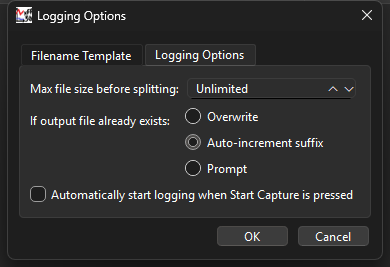
- Max file size before splitting - "Unlimited", or a size that auto-splits the log into multiple files once exceeded.
- If output file already exists - Overwrite, Auto-increment suffix (the default), or Prompt.
- Automatically start logging when Start Capture is pressed - skips the separate manual Start click on this tab.
Log Replay
Start Replay... loads a previously-saved log file back through the exact same pipeline a live capture uses - Trace view, Graph view, and decode all behave identically, there's no separate "replay mode" logic to learn. Stop Replay ends it early. See Architecture: Logging & Replay for why this works with zero special-casing.